You shoot the image. You edit the image. Then you sit down to write the title, description and 30–50 keywords — for every single file.
A 50-image shoot can mean 3–4 hours of metadata work before a single file is submitted. It's repetitive, it's slow, and it's the part of stock photography nobody talks about.
Most photographers either rush it and leave money on the table, or avoid uploading altogether because the process is too painful. After 20+ years of shooting stock, I had thousands of images sitting on drives — never submitted, never earning — because the metadata step was too much friction. That's real money left behind every single year.
AI that thinks like a stock reviewer.
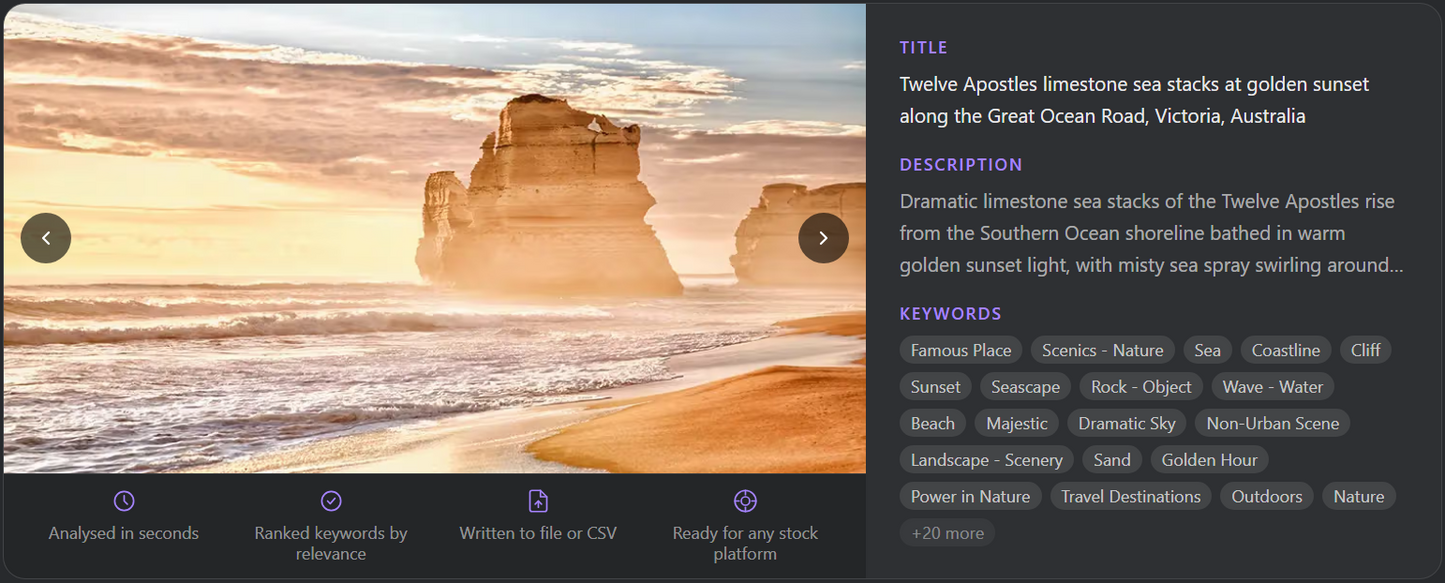
ShotMeta uses Anthropic's Claude vision AI to analyse your image or video and generate a submission-ready title, description and keyword set — instantly.
It goes deeper than basic object detection. Claude understands composition, subject matter, mood, colour, setting, context, location, landmarks, famous places, business concepts and ideas. The keywords it generates reflect how real buyers actually search — not just what's visible in the frame.
For videos, multiple frames are analysed to capture movement and action. For photos, metadata is written directly into the file. For videos, a CSV is generated for Deepmeta and other upload tools.
Unlike other metadata tools that upload your full images to their own servers, ShotMeta only sends a compressed version to Anthropic's API — the same infrastructure behind Claude.ai. No unknown third-party storage. No bulk upload of your full-res files.
How ShotMeta Works
Four steps. Metadata done.
01 Open ShotMeta
Launch the app on Mac or Windows. Add your Anthropic API key once — that's the AI engine that powers the analysis.
02 Browse to your files
Browse to your photos or videos. Batch process an entire shoot at once or go file by file.
03 AI analyses your content
ShotMeta sends your files to Anthropic's vision AI for analysis. Photos are read for subject, composition, mood and context. Videos are analysed across multiple frames to capture movement and action — not just the first frame.
04 Output ready to submit
For photos, metadata is written directly into the file — drag it straight to your upload queue. For videos, a CSV is generated for import into Deepmeta, Bulk Content Manager or any upload tool.
What ShotMeta Does
🖼 Deep Photo Analysis
Reads subject, composition, colour, mood, setting, context, location, landmarks, famous places and business concepts. Generates metadata that matches what buyers actually search for.
🎬 Multi-Frame Video Analysis
Doesn't just read the first frame. Analyses movement across multiple frames to capture action keywords — running, pouring, cutting, falling — that static analysis misses.
📁Smart Output Formats
Photos: metadata written directly into the file — ready to upload. Videos: a CSV file is generated for import into Deepmeta, Bulk Content Manager or any upload tool.
⚡Batch Processing
Drop an entire shoot at once. ShotMeta processes multiple files and delivers ready-to-submit metadata for each one.
🏷 Works With Every Platform
Getty Images, iStock, Adobe Stock, Shutterstock, Pond5, 500px and more. Output matches each platform's title length, keyword count and description format.
💸Costs Pennies Per Image
ShotMeta uses your own Anthropic API credits. A typical image costs a fraction of a cent to analyse. You control your usage and spend.
🔒Processed by Claude AI
A compressed version of your file is sent to Anthropic's Claude API for analysis — not to any DrRave server. Anthropic does not store or train on API data. Internet required.
🔑 Lifetime License
$29 once. No subscription, no renewal, no price increases. Buy it and use it forever.
Frequently Asked Questions
What AI does ShotMeta use?
ShotMeta uses Anthropic's Claude vision model — the same AI that powers Claude.ai. You bring your own API key from console.anthropic.com. API usage is billed by Anthropic directly at a fraction of a cent per image.
Do I need an Anthropic account?
Yes. You'll need a free Anthropic account and an API key from console.anthropic.com. Add credits to your Anthropic account and ShotMeta uses them as you process files. A typical image costs less than $0.01 to analyse.
Does ShotMeta send my photos to any server?
A compressed version of each file is sent to Anthropic's Claude API for analysis — the same infrastructure behind Claude.ai. Your files never touch any DrRave server. Anthropic does not store or train on API data. Internet connection is required.
Does it need an internet connection?
Yes. ShotMeta sends a compressed version of your files to Anthropic's Claude API for analysis. An active internet connection is required while processing.
Which stock platforms does it support?
ShotMeta works with all major stock platforms — Getty Images, iStock, Adobe Stock, Shutterstock, Pond5, 500px and more. Output format matches each platform's title length, keyword count and description requirements.
What format is the output?
For photos, metadata is written directly into the image file (IPTC/XMP). For videos, ShotMeta generates a CSV file you can import into Deepmeta, Bulk Content Manager or any upload tool. You can also open the CSV in Excel and copy-paste manually.
Does it work for video?
Yes. ShotMeta analyses multiple frames of your video to capture movement and action keywords — not just what the first frame shows. Output is a CSV ready for Deepmeta or any bulk upload tool.
How accurate is the metadata?
Very accurate. Claude's vision model understands composition, subject, mood, colour, location, landmarks, business concepts and context — not just surface-level object detection. Most users find the output needs minimal editing.
What does it cost to run?
$29 once for the app. Anthropic API usage is separate — typically $0.005–$0.01 per image. A 100-image shoot costs roughly $0.50–$1.00 in API credits.
Does it work on Mac and Windows?
Yes. One purchase covers both platforms.